fbpx

Complete Guide to Project Management with PMBOK

Seldom have I seen programs run perfectly, and it is important to have a streamline strategy to deal with obstacles and challenges to effectively manage a project or program. 


If you need to deliver projects on time, within budget, and while satisfying all stakeholders, then you must have an efficient project management strategy. But what does best-practice project management look like, what are the best frameworks to use, and what features make or break the software you choose?


Because of this most project management professionals rely on the PMBOK Guide to enhance their efficiency and achieve their project objectives. An acronym for Project Management Body of Knowledge, PMBOK has established itself as an essential resource for effective project management practices


Here, we’ll explore the background of PMBOK, take a look at some project management methodologies, frameworks, processes, and some tips and tricks for successfully implementing PMBOK in your work environment.

What Is Project Management according to PMBOK

According to PMI “Project management is the application of knowledge, skills, tools, and techniques to project activities to meet project requirements.  It’s the practice of planning, organizing, and executing the tasks needed to turn a brilliant idea into a tangible product, service, or deliverable”


PMBOK is a set of guidelines, best practices, and standards for managing projects effectively. It is developed by the Project Management Institute (PMI), it provides a comprehensive framework that is widely accepted and utilized in all industries universally. 


PMBOK is a vast concept and it requires an adequate amount of time and effort to get familiar with its concepts and techniques.

What Is the PMBOK® Guide?

PMBOK, or Project Management Body of Knowledge, is a set of guidelines, best practices, and standards for managing projects effectively. Developed by the Project Management Institute (PMI), it provides a comprehensive framework that is widely accepted and utilized in the industry.

Core Components

PMBOK is organized into ten knowledge areas and five process groups, which collectively cover all aspects of project management.

1. Knowledge Areas

Integration Management: Ensuring that project elements are properly coordinated.


Scope Management: Defining and managing the work required.


Schedule Management: Managing timely completion.


Cost Management: Planning and controlling the budget.


Quality Management: Ensuring the project meets requirements.


Resource Management: Managing people, materials, and equipment.


Communications Management: Facilitating effective information flow.


Risk Management: Identifying and mitigating risks.


Procurement Management: Acquiring necessary resources.


Stakeholder Management: Engaging stakeholders appropriately.

2. What can you as Project Management do with PMBOK

You can leverage the Project Management Body of Knowledge (PMBOK) to enrich your understanding of standardized processes, guidelines, and best practices in project management. This familiarity enhances your adaptability and versatility within diverse project environments. Moreover, seasoned project managers can seamlessly transition to new companies or industries, and take advantage of your PMBOK knowledge without starting from scratch.


The PMBOK guide serves as a comprehensive repository of key terms, project-related functions, and fundamental principles of effective project management. Irrespective of one’s level of experience, PMBOK content offers opportunities for continuous learning and skill enhancement, thereby augmenting a project manager’s efficacy.


In times of project challenges or complexities, project managers can turn to the PMBOK guide as a trusted resource, tapping into expert recommendations and insights to navigate obstacles effectively.


Now, let’s delve deeper into the PMBOK guide, exploring its process groups and knowledge areas to further understand its invaluable contributions to the field of project management.

3. Five Project Management Process Groups

The Project Management Body of Knowledge (PMBOK) guide delineates five essential project management process groups:


Initiating

Initiating processes encompass all activities necessary to obtain approval for a new project or the commencement of a new phase within an existing project. This phase involves defining the project’s initial scope and identifying key stakeholders crucial for project success.


Planning

Planning processes play a pivotal role in establishing the comprehensive scope of the project. Within this process group, project managers undertake 24 critical processes. These include creating a work breakdown structure, defining project activities, estimating activity durations, and projecting project costs.


Executing

Executing processes entail the actual implementation of the project plan. This phase encompasses all activities required to execute the defined project activities and deliverables successfully.


Monitoring and Controlling

Project managers rely on monitoring and controlling processes to assess project progress and ensure adherence to the project management plan. This phase involves continuous evaluation, identification of variances, and implementation of corrective actions to maintain project alignment with objectives.


Closing

Closing processes are indispensable for the culmination of a project or project phase. During this phase, project managers oversee the systematic closure of project activities, including archiving project records, conducting project reviews, and facilitating stakeholder engagement to reflect on project outcomes and lessons learned.

Project Management Methodologies

Waterfall:

A linear, sequential which emphasizes on completing each phase before the next begins. The waterfall approach is best suited for projects with well-defined requirements.


Agile:

An iterative approach that focuses on collaboration, customer feedback, and small, rapid releases. Suitable for projects where small changes in requirements are expected.


Scrum:

A subset of Agile, Scrum emphasizes teamwork, accountability, and iterative progress through sprints.


Kanban:

A visual workflow management method that helps teams visualize their work, limit work-in-progress, and maximize efficiency.

Implementing PMBOK in Your Work Environment

Tailoring PMBOK: Adapt PMBOK guidelines to fit the specific needs and context of your project. Not all processes are required for every project; select those that add the most value.


Training and Certification: Consider pursuing PMI’s Project Management Professional (PMP) certification to deepen your understanding of PMBOK and enhance your credentials.


Practical Tools: Leverage project management software that aligns with PMBOK standards. Look for features like task management, scheduling, budget tracking, and reporting.

Best Practices

Stakeholder Engagement: Regularly communicate with stakeholders to manage expectations and gather feedback.


Risk Management: Proactively identify risks and develop mitigation plans.


Documentation: Maintain thorough documentation to ensure transparency and accountability.

By following PMBOK guidelines and integrating them with the right project management methodologies, you can improve project outcomes, enhance team collaboration, and achieve your project goals more efficiently.

Unlocking the Power of PMBOK Principles

Optimizing Your Project Management Workflow. Embarking on a project management journey often reveals its intricacies, prompting the quest for streamlined workflows that save precious time and effort. 


The key to mastering efficiency lies in leveraging the right arsenal of tools. While the market offers various project management solutions, none quite compare to the comprehensive prowess of KiteSuite.


Utilize the project management concepts outlined in the PMBOK guide seamlessly with the robust capabilities of KiteSuite.

Monitoring and Controlling Processes

Effective project management relies on diligent monitoring and controlling processes to ensure projects stay on track, mitigating risks of cost overruns resulting from errors or delays. With KiteSuite’s intuitive platform, you gain access to a comprehensive suite of tools and features designed to facilitate meticulous project oversight.

Empowering Project Management with KiteSuite

KiteSuite offers a dynamic project management platform equipped with pre-built templates and a range of customizable tools, empowering you to monitor every aspect of your projects effortlessly. By leveraging custom templates tailored to your specific needs, you can streamline project tracking, streamline approval processes with key stakeholders, and meticulously plan each project within its dedicated workspace.

Key Features and Benefits

Built-in Templates: Gain immediate access to a diverse array of pre-designed templates, reducing setup time and accelerating project initiation.


Tailored Workspaces: Customize workspaces to align with the unique requirements of each project, fostering clarity and cohesion among project teams.


Streamlined Communication: Facilitate seamless communication and collaboration across teams with intuitive tools for sharing updates, files, and feedback.


Real-time Monitoring: Stay informed of project progress in real-time, enabling proactive decision-making and timely interventions to address potential issues.


Data Visualization: Leverage visual dashboards and reports to gain actionable insights into project performance, enabling informed strategic decisions.

Elevate Your Project Management Experience


By integrating PMBOK principles with KiteSuite’s powerful project management platform, you can optimize project outcomes, enhance efficiency, and drive sustainable success across your organization.

Mastering KiteSuite: Best Practices to Get Started

Let me start by asking: Are you flying solo or with your team? It’s a big decision, but no worries—KiteSuite have you covered. With its versatility and customizable options, KiteSuite is your go-to campaign tool, tailored to your needs.
Whether you’re a KiteSuite pro or just getting started, there’s always more to explore. From new features to clever workflows, there’s a world of possibilities waiting for you.
In this guide, we’ll share insider tips, handy tricks, and essential tools straight from the KiteSuite team. Discover how they manage schedules, collaborate seamlessly, and much more!
But remember, what we discuss here is just the beginning. Each feature in KiteSuite is like a jack of all trades—versatile and full of potential.
So, let’s embark on this journey together and unlock the true power of KiteSuite!

Follow our Hierarchical Structure

It is always a good idea to understand the hierarchy to take full advantage of a software solution. If you’re jumping into a team already utilizing KiteSuite, your initial focus should revolve around grasping their hierarchy setup. Even if you’re flying solo with KiteSuite, your primary objective should be defining your own hierarchy structure.
workspace
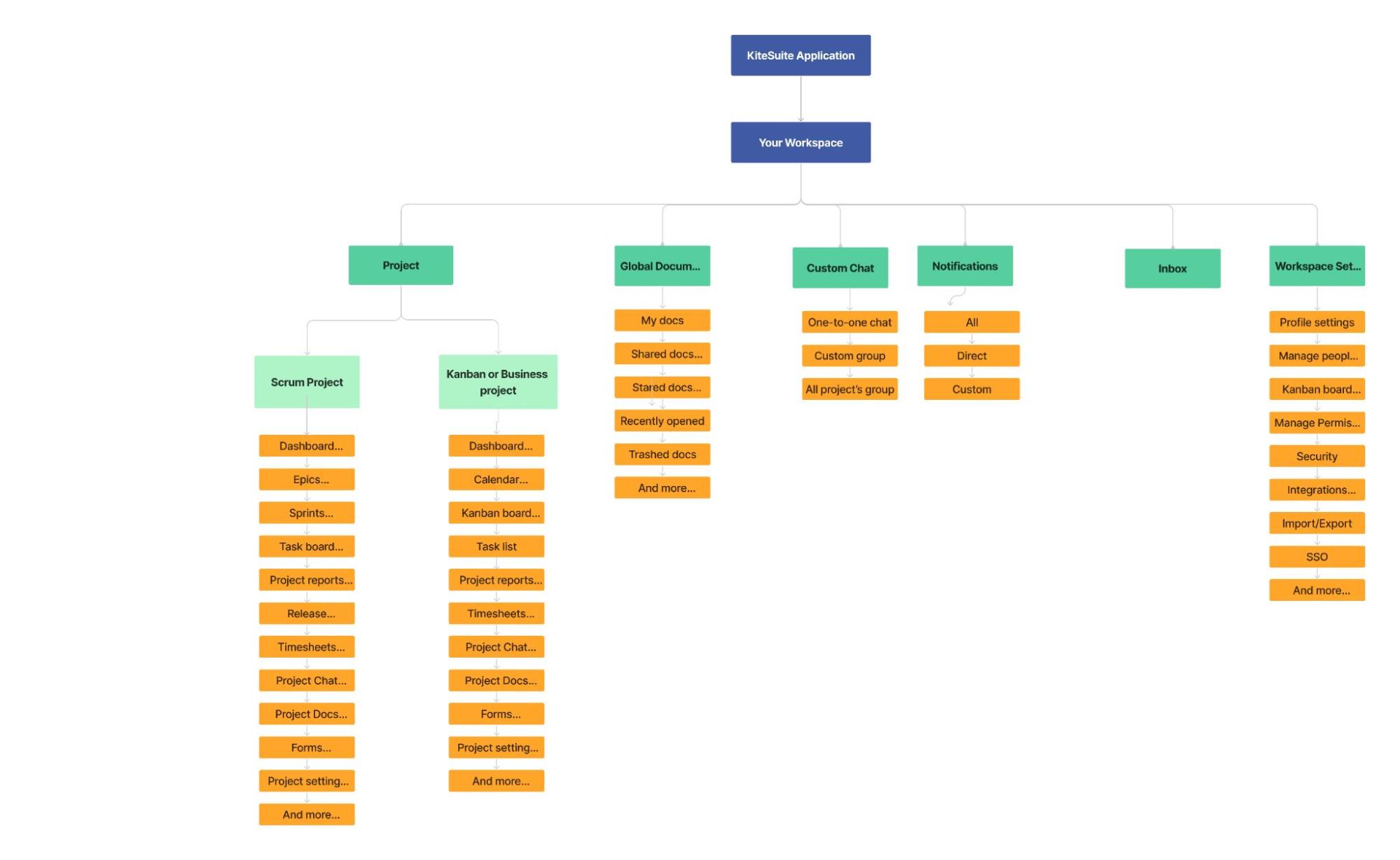
At the top of the hierarchy as you can see comes your workspace or you can also say your organization project department. This is the first thing you will do while setting up your account with Kitesuite.
You can create as many workspaces as you want as per your organization’s need. It is always a great idea to add members into your workspace with different access levels as per their role because only added members can see workspace details.
Under workspace there are projects, and you can create as many projects as you wish to in a single workspace. Projects are further divided into three main categories: Scrum, Kanban, & Business. In the current version of KiteSuite kanban and business project types project are exactly the same. Each project can have the same or different members and there are project level settings to efficiently manage your project work. Also there is an option to share Items from one project to another to manage responsibilities.
Within each project, a variety of features are available to aid in effective Item management and workflow control, as illustrated in the provided screenshot. Key features to consider include status tracking to monitor progress and streamline workflow, report, Item board, sprints, project chats, calendar, and more.
KiteSuite empowers you to tailor the complexity of your projects according to your needs. With each project added to your workspace, you have the flexibility to select from a range of project types, including customizable fields, due dates, epics, sprints, time tracking, and more.
As demonstrated, KiteSuite offers a diverse array of features to accommodate various project requirements, ensuring that you have the tools necessary to tackle any Item effectively!

Dashboard

In each project, you’ll find a dashboard which provide you with
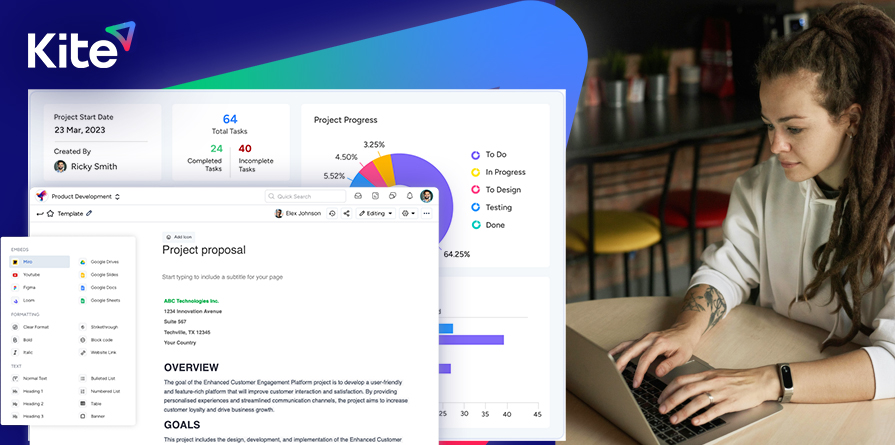
Project information overview at a quick glance: Easy check project data with completed and pending status, stay updated with sprints info., know project’s initiation date and owner information.
It provides you real-time project progress updates, Weekly calendar with different times, keep updated with your daily/weekly meeting.
Graphical representation of project perforation data: Show all projects the user owns. Include information like project name, type and key and show project members list

Epic

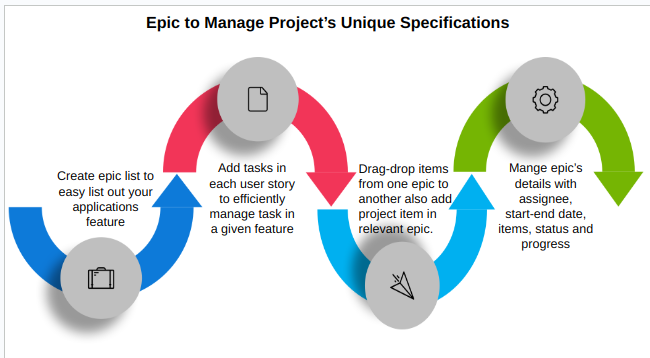
Epics is part of Scrum project type, serving as optional containers to streamline project organization. When your project starts to feel cluttered, epics offer a great solution to tidy things up.
manage project
Next in line are Project board and Lists. While not strictly subordinate to Folders in the hierarchy, Lists can be placed directly in a project or added to a Folder. These Lists function as holders for related Items.

Sprint and Kanban boards

It serves as the default visualization method, providing a comprehensive and highly customizable way to manage Items. While there are various other visualization options known as Views, starting with the List view is often the most straightforward approach.

Scrum Board

Kanban Board

Items

Despite their seemingly low position in the hierarchy (even their name isn’t capitalized!) items form the backbone of any project and offer extensive customization options.
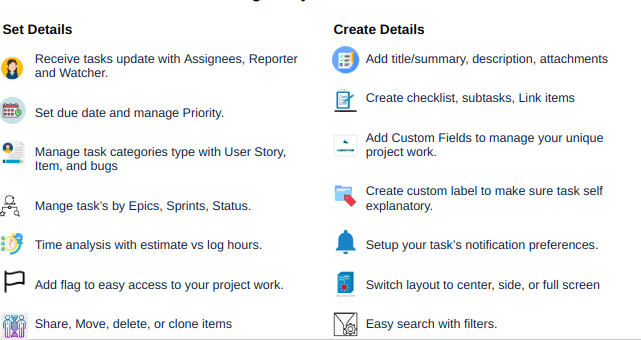
Items can be assigned to multiple individuals, and if someone only needs visibility into a Items, they can be added as a watcher. Start and due dates, including specific times, can be assigned to Items. Additionally, Items can include subtasks, essentially creating an Item within a Items (Items-ception!). Checklists, attachments, ClickUp Docs, and more can be added to Items, making them incredibly versatile and essential components of project management. We’ll delve deeper into Items in subsequent discussions.
image3

Calendar

Here is another great tool from KiteSuite for project management with its advanced calendar and meeting management functionality.
There are different views to check your daily, weekly and monthly meetings and tasks across different timeframes.
You can create custom meetings effortlessly, enabling seamless collaboration among team members by adding an easy joining meeting with your team.
Furthermore, the meeting feature comes with notification functionality where you can add customized notifications when and how you like to notify your invite by email or KiteSuite. Multiple notification types can be set as per your preference.

Sprint

In KiteSuite, the Sprint project type includes a Sprint Board/List feature where you can create and manage backlog items and different sprints.

Frequent Updates and Communication

Encourage regular updates on tasks and progress within the software, utilizing visualization tools to identify potential obstacles or dependencies. Communicate progress and updates to stakeholders through built-in reporting features.

Establish Clear Workflows

Define transparent processes for task creation, assignment, and progress tracking, ensuring consistency and clarity across the team.

Backlog Items: This is the very first category on the sprint board/list which displays all items or user stories list that are yet to be prioritized or assigned to a sprint.

Prioritization: Drag-and-drop functionality to prioritize backlog items to the current sprint you are about to start.

Categorization: Add tags, labels, or custom fields to categorize and categories items.

Release

KiteSuite release allows organization to stay updated with project progres. All the completed items in a sprint will automatically show in the available releases so that you can essay include the current release planning notes. This will help users to streamline the project process. As the release progresses, users can include release notes. These notes provide important context and what type all features are complete in the particular release. Users can easily modify tasks later in case a wrong item is added or further improvement or changes are required in the current release or added task.

TimeSheets

KiteSuite timesheet provides comprehensive tracking of estimated and logged time by different project team members every week. You have an ability to filter data to view and trace different members, check historical data according to your preference to gain insight about project performance.
It will foster the culture of honesty and transparency into project progress and resource allocation. It will give project managers identify trends, monitor sprint velocity, track productivity, and make informed decisions. Additionally team members will also be able to optimize their workflow and timelines for better performance on project activities.

Project chats

KiteSuite has a default project team chat group created where all the project members will be included. This ensures that all team members have quick access to start instant collaboration without manually adding individuals.

It also allows users to create a custom group or have one to one conversation among team members to specific project needs. This is to have privacy related to sensitive discussion among different teams and individuals.
Team members also receive notification on various actions such as individual mention, all team members mention, media receive, message replies, addition to a new group and more.

Reports

KiteSuite offers an exclusive reporting system tailored to different project types (Including, Sprint, Kanban, Business, and custom templates). The built-in reports enable all project sponsors and stakeholders to track progress, understand overall health of the project. It gives access to key metrics such as project cost, delivery timeline, so that you can swiftly assess project performance and make informed decisions. It will help you understand whether you should continue with the current planning, process and team, or it is time to modify. Additionally it will tell you if you are on the right trajectory in earning value management according to your benefit management plan with your project progress and expectations.

Project Settings

Here you can easily manage project settings. Users have an option to edit/update or delete all the project related information including project name, project avatar, project lead, project estimation type, and description. Nevertheless project type and project key are ready only, users cannot change these.

Document

Like everything else in KiteSuite, Docs integrate seamlessly into the larger KiteSuite ecosystem. Within a Doc, you can mention a user, task, or even another Doc! You can embed resources from both within and outside KiteSuite. Plus, you can create as many pages as you want in each Doc, making it perfect for creating glossaries or wikis.
As the saying goes, “There’s so much room for activities!” In addition to standard word processor functions like adding a table of contents, comments, or tables, anyone with access to a Doc can add to or edit it, making it a fantastic collaboration tool.
It is pretty amazing to use! I keep a Doc with notes from all my meetings, where each meeting is a line in the table of contents for quick reference. This way, you have a running log of all topics, tasks, and assignments mentioned in any meeting you attend.
You can easily add a Doc to a task as an attachment by clicking “Add” next to “Attachments” in a task and selecting “New Doc.” This is especially useful for tasks that involve a lot of text, such as writing a blog.
Docs can also be added as a View to a List or Folder, which is perfect for content that many people need to reference or contribute to, such as glossaries, best practices, or SOPs.
If you’re looking for a good place to start with KiteSuite, I recommend creating documents and experimenting with these features. Docs provide an excellent environment for taking notes and connecting and visualizing your content

Forms

Keep your project flowing with KiteSuite’s intuitive drag-and-drop form builder. You can easily create, share, and submit forms to capture responses instantly with KiteSuite form. Also receive feedback, expert judgment, and conduct surveys swifty. Kiteform not only allow users to submit their response but also create tasks in the respective project so that you can navigate back at your convenience.
KiteSuite online form builder that allows you to create and manage forms easily. It provides a wide range of features which help you to create forms for various purposes, such as surveys, contact forms, registration forms, order forms, and more. Here’s a brief overview:

Intuitive drag-and-drop

Making it easy to create forms without any coding knowledge just simply drag and drop the field into the form or simply click on the plus icon.

Form Templates

There are numerous pre-designed templates available, which can be customized to suit specific needs. Templates cover various categories like business, education, healthcare, and more.

Form Fields and Widgets

Users can add a variety of form fields such as text boxes, dropdowns, radio buttons, checkboxes, and file uploads. Additionally, JotForm provides a range of widgets to enhance functionality, including e-signatures, payment integrations, and more.

Conditional Logic

Forms can be made dynamic with conditional logic, which allows certain fields to be shown or hidden based on user responses.

Advance Design

Users can set custom sizes of forms as per their preference, including width, vertical Padding, horizontal Padding, Input area Width (In PX):
Users can set input area width to easily manage the form.

Form corners: Users can choose from different options (Rounded, fully rounded, rectangular) how they like to keep their form’s layout.

Line Layout: Users can set “Line spacing, Horizontal and vertical padding spacing” to easily control the space between text and elements.

Line spacing: Range selector where users have an option to select spacing between different form fields from (0-40 px). The spacing between form fields should update accordingly in real-time.

Vertical padding: Users have the option to increase or decrease the space between fields top and bottom edges.

Horizontal padding: Users should have an option to adjust spacing to all forms fields left and right edges.

Integrations

KiteSuite integrates with numerous third-party applications, including payment gateways (like PayPal, Stripe), CRM systems (like Salesforce), email marketing tools (like Mailchimp), and cloud storage services (like Google Drive, Dropbox) and more.

Conclusion

With these KiteSuite team-approved tips and insights at your disposal, you’re all set to explore the platform.
For any questions, our comprehensive help docs are a great resource, or you can reach out to our client success team. Unlike other customer service teams, we genuinely love to help and are eager to answer your questions! If you notice we’re missing a feature, let us know by adding it to our feedback board.
We’re likely already working on it, but we value your input and want to ensure our platform meets all your needs. After all, we’re committed to creating the perfect project management solution!
Take the time to experiment with the settings and customize them to best suit your team. Our extensive customization options are one of the standout features of KiteSuite. Enjoy using the tool, boost your productivity, and don’t hesitate to reach out with any questions or feedback!

KiteSuite for Small Businesses: Solutions and Strategies for Growth

Small businesses have emerged as beacons of resilience and sustainability ever since the human race began. Beyond just surviving, Small businesses thrive, with a remarkable all time average rate of 7-8 percent per year. They are the backbone of our economy—also it’s a testament to the growing awareness among consumers.


Today’s shoppers are more discerning than ever, seeking transparency and accountability from the brands they support. Large corporations, once seen as untouchable giants, are now under scrutiny for their ethical, social, and environmental practices. In contrast, small businesses offer a refreshing alternative.


When you choose to support a small business, you’re not just making a purchase; you’re making a statement. You’re investing in quality, craftsmanship, and community. Small businesses often prioritize sustainability, creating products that are ethically sourced and made to last. Beyond the transaction, you’ll find a personal touch, a genuine connection that’s hard to replicate in a corporate setting.


But it’s not just about the products—it’s about the experience. Shopping small means personalized service, attention to detail, and a sense of belonging. It’s about supporting a dream, a passion, and a livelihood.


So, as we navigate these uncertain times, let’s remember the power we hold as consumers. By choosing small, we’re not just supporting businesses—we’re shaping a brighter, more sustainable future for all.


It’s incredible to reflect on the journey of entrepreneurship, especially as a former small business owner myself. I remember the long hours, the tireless dedication, and the endless hustle required to turn a dream into reality. If only tools like KiteSuite had been available back then, I could have saved countless hours and headaches.


So, let’s dive into the features of KiteSuite that would have been game-changers for me and countless other self-made entrepreneurs:


Streamlined Task Management: KiteSuite’s intuitive task management system would have been a lifesaver. From organizing orders to tracking inventory, having all tasks in one place would have saved me from drowning in post-it notes and spreadsheets.


Efficient Collaboration: As a one-woman operation, collaboration wasn’t always easy. With KiteSuite’s collaboration features, I could have easily shared tasks with freelancers, suppliers, and partners, streamlining communication and ensuring everyone was on the same page.


Customizable Workflows: Every business is unique, and KiteSuite’s customizable workflows would have allowed me to tailor the platform to my specific needs. Whether managing production schedules or tracking customer inquiries, I could have created workflows that mirrored my business processes perfectly.


Integrated Calendar: Keeping track of deadlines and appointments was a constant struggle. With KiteSuite’s integrated calendar, I could have easily visualized my schedule, set reminders, and stayed on top of important dates without the fear of missing a beat.


Time Tracking: As a small business owner, time is your most valuable resource. KiteSuite’s time tracking feature would have allowed me to monitor how much time I was spending on each task, identify inefficiencies, and make adjustments to maximize productivity.


Document Management: From design mock-ups to vendor contracts, managing documents was a headache. KiteSuite’s document management system would have provided a centralized repository for all my files, making it easy to find what I needed when I needed it.


Automation: Automating repetitive tasks would have been a game-changer for me. With KiteSuite’s automation features, I could have saved time on manual processes like order confirmations and inventory updates, freeing up more time to focus on growing my business.

My Story of working Hard

Fresh out of coding bootcamp, I was fueled by a passion for innovation and a desire to disrupt the tech industry. Armed with a brilliant idea and a few lines of code, I embarked on the exhilarating journey of launching my own software startup.


The initial excitement was palpable as my team and I worked tirelessly to bring our vision to life. Late nights turned into early mornings as we poured our hearts and souls into building our product from the ground up.


But as the months passed and the complexities of running a startup began to surface, our once-promising venture faced its fair share of challenges. Communication breakdowns, feature creep, and looming deadlines threatened to derail our progress at every turn.


Despite our best efforts, our development process resembles more of a chaotic sprint than a strategic roadmap. Tasks piled up, priorities shifted, and our once-clear vision became muddied amidst the frenzy of activity.


It wasn’t until a pivotal moment—a critical bug that slipped through the cracks and caused a major setback—that we realized something had to change. We couldn’t afford to continue operating in a state of disarray, risking the success of our startup on a foundation of chaos.


Enter KiteSuite—the lifeline we didn’t know we needed. With its comprehensive project management features and intuitive interface, KiteSuite revolutionized the way we worked. From task allocation to deadline tracking, KiteSuite provided the structure and organization we desperately needed to regain control of our development process.


Gone were the days of missed deadlines and miscommunications. KiteSuite kept us aligned and on track, empowering us to focus on innovation and execution without the distractions of disorganization.


Thanks to KiteSuite, our startup thrived in a competitive landscape, earning recognition for its innovation and efficiency. With a newfound sense of clarity and purpose, we navigated the challenges of entrepreneurship with confidence, knowing that KiteSuite had our backs every step of the way.


Today, as I reflect on our journey from chaos to control, I’m grateful for the lessons learned and the tools that helped us succeed. With KiteSuite by our side, there’s no limit to what we can achieve—and that’s the true essence of startup success.

Get started using KiteSuite for your small business

Let’s dive right in! Below is a quick guide to help you get started with KiteSuite for your small business:

1. Create your Workspace and Projects

Start by creating a Workspace, which is like your own virtual office building.


Within your Workspace, create a Space named after your business. Think of this as your business’s central hub.


Create Folders within your Space for different categories such as Finances, Marketing, and Production.

2. Set-up Project board (Scrum or Kanban)

Lists live within Folders and are where individual tasks reside.


Create Lists based on sub-categories within your business. For example, within the “Marketing & Advertising” Folder, create Lists like “Sponsored Ads,” “Social Media,” and “Influencer Partnerships.”

3. Create tasks with Custom Fields

Tasks in KiteSuite can represent actions or items on a list.


Utilize Custom Fields to add specific details to your tasks. These can include dropdown menus, tags, text boxes, and more.


For example, for a shirt shop, each design could be a task with Custom Fields for size, color, and price.

4. Create a budget

Use Lists with Custom Fields to create a budgeting system. You can organize tasks by different statuses and utilize Formula Fields to calculate totals.


This can help you track expenses, revenue, and overall financial health.

5. Create an order tracking system

Similar to budgeting, use Lists and Custom Fields to track orders from placement to fulfillment.

Include fields for order details such as customer name, order date, status, and tracking information.

6. Add helpful views to your Folders

Explore different views like Calendar view to visualize due dates and deadlines.

This can help you stay organized and plan your workload effectively.

7. Utilize Automations:

Set up Automations to automate repetitive tasks and save time.


For example, automate status changes for product tasks based on inventory levels to streamline restocking processes.

8. Grow your team

As your business grows, consider adding team members to collaborate more effectively.


Take advantage of KiteSuite’s communication features like Chat views and Assignees to delegate tasks and stay connected.


By following these steps, you can leverage KiteSuite to streamline your business operations, improve organization, and ultimately drive growth and success for your small business.

9. Take benefit with our advance Form

Utilize Kitesuite form’s advance design features to match to your website’s branding, weather to collect feedback, share event, or sell your product, yet that’s correct you can sell your product just by simply using kitesuite forms as it include payment gateway integrated and other third party tools to provide you simless experience. It can be really beneficial for your small business when you are not really willing to invest into website development just when you are starting out.

Small steps to Thrive into your business success

Crafting a successful business isn’t just about big dreams; it’s about executing numerous small, strategic steps. What makes starting a small business so exciting is that initial success isn’t solely dependent on the size of your investment. It’s about laying a solid foundation through smart organization, meticulous planning, and diligent tracking of every detail.


Now, when I look back on my entrepreneurial journey it was both exhilarating and challenging. Within a month, I turned a profit substantial enough to reinvest, yet without a robust, adaptable system in place, I struggled to maintain momentum as my business expanded.


However, I refuse to dwell on what could have been. Regrets serve no purpose in the realm of business; instead, I view past missteps as invaluable lessons learned. After all, how could I fault myself for decisions made with the knowledge I possessed at the time? While tools like KiteSuite could have alleviated many of my challenges, I firmly believe that true success emanates from personal initiative. Sometimes, growth simply requires a bit more time and patience to flourish.


Having a vision and seeing it come to fruition is undeniably gratifying. Yet, true fulfillment comes from pushing beyond one’s comfort zone, embracing calculated risks, and investing unwavering effort. It’s crucial to heed the wisdom of those more experienced while remaining true to one’s instincts.


So, seize the opportunity before you and pursue your aspirations with determination. Success is within reach for those bold enough to chase it.